

 Construction management

The operational brain
of your construction company.
EDIFORIUM connects the office, the field, employees, subcontractors and clients in a single system, so you always know what’s happening on every job site.
To make EDIFORIUM the best job site management system for contractors and their employees, and Finance OS the best accounting and financial management system.
That goal guides every feature we design: less time wasted, more control, and contractors who actually want to open the app every morning.
Your whole company, finally in one place.
No more scattered texts, calls, photos and Excel files. EDIFORIUM brings the essentials into one system.
Organized job sites
Progress, scheduling, plans and documents in one place.
Crews and materials tracked
Who is where, with what equipment, and what was delivered.
Clear communication
Office, field, subcontractors and clients on the same page.
Change orders under control
Documented, priced and approved electronically by the client.
A view on profitability
Actual costs, budget and projected margin, job by job.
Four steps, one system.
Set up your job sites
Add your projects, crews, plans and equipment.
The field documents
Employees clock in, take photos and report from their phones.
The office approves
Hours, change orders, deliveries and reports get approved.
You stay in control
Track progress and profitability; connect Finance OS if you wish.
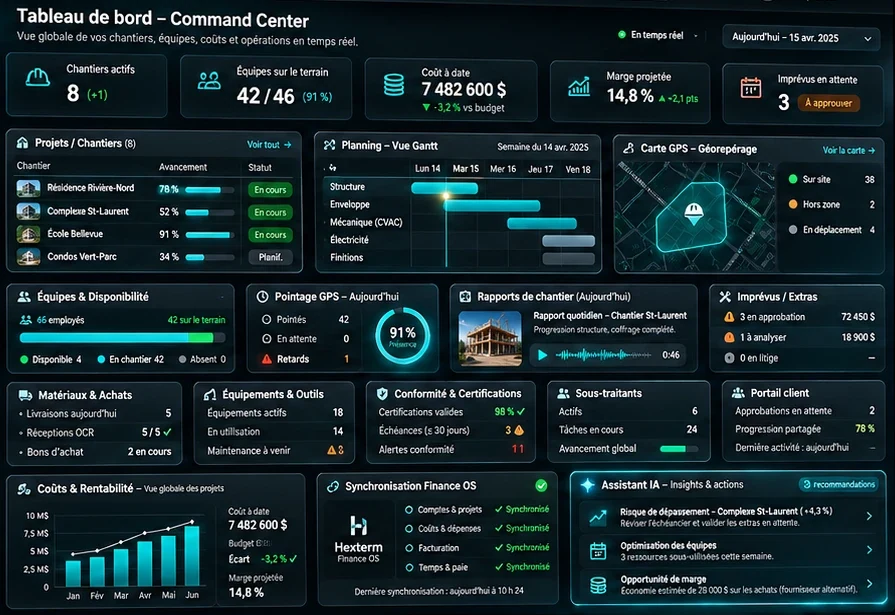
A true command center.
Job sites, crews, costs, deliveries, compliance and profitability: your company in real time, on a single screen.
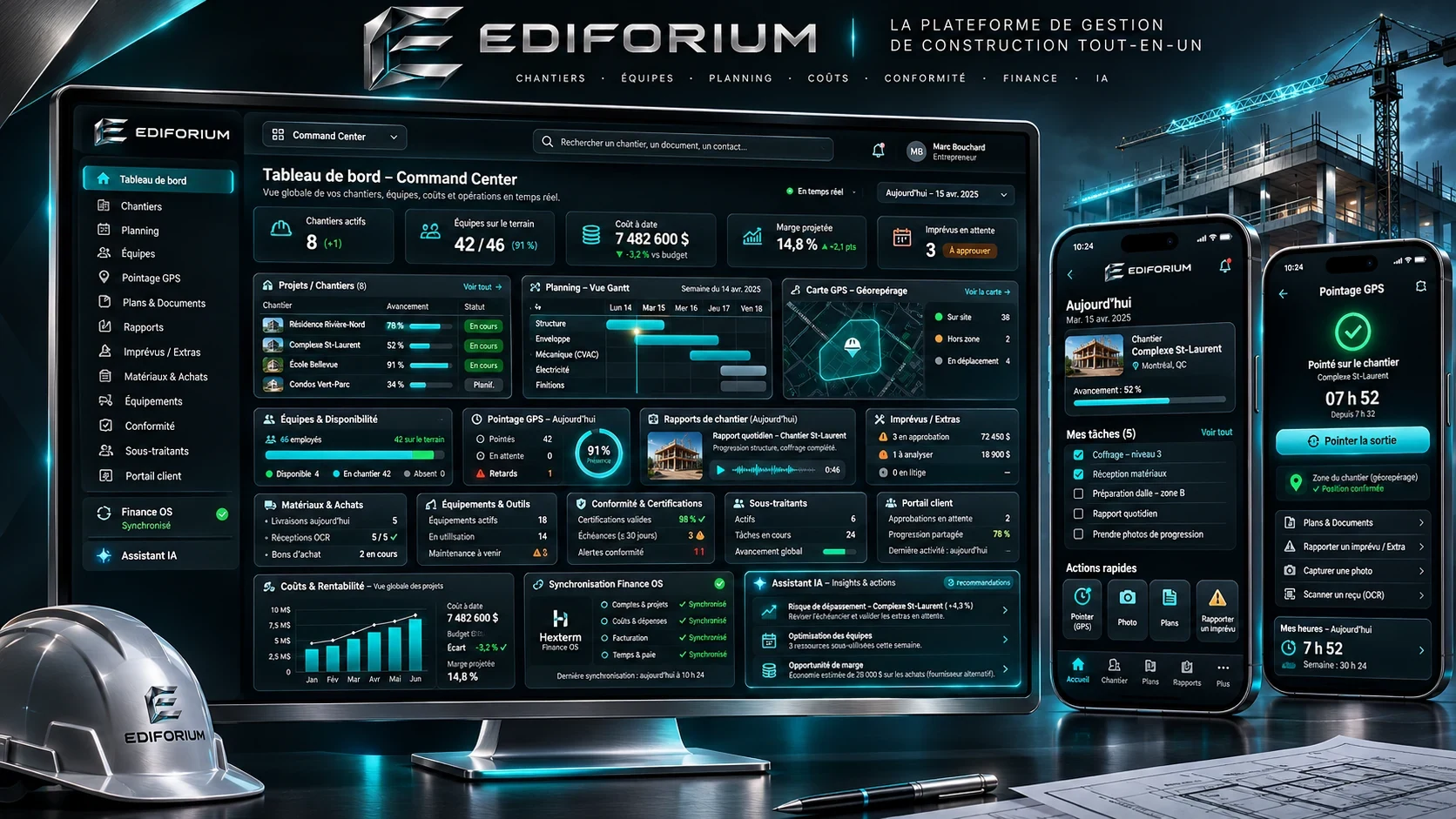
See all 18 command center modules
Simple. Fast. Built for the field.
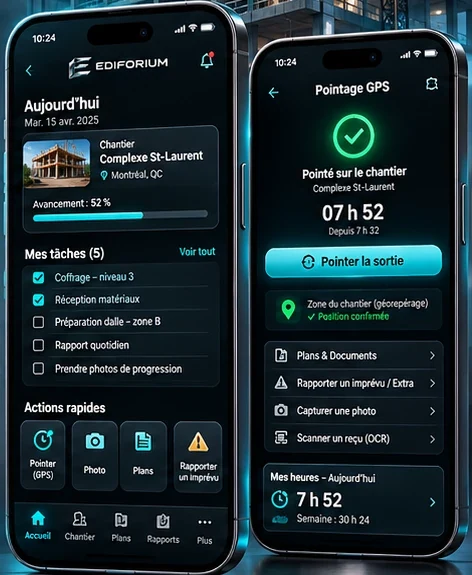
The employee app is deliberately minimal: just the essentials. Less time in the app, more time on the job.
See everything they can do in one tap
There isn’t always a signal on a job site. Much of EDIFORIUM is designed to work offline, then sync automatically as soon as the phone is back online.
From the first punch to the evening report.
Fictional exampleMarc clocks in, GPS confirms the job site.
He checks his tasks and the latest plan revision.
Voice note: “Eight panels are missing.” AI creates the issue and alerts the foreman.
The delivery slip is scanned: 92 of 100 panels, the gap is flagged.
A change order goes to the client, who approves it from the portal.
The daily report is ready. The foreman reviews and approves it.
Just speak. EDIFORIUM handles the rest.
The assistant is designed to turn what’s said in the field into useful, organized information that’s ready to be approved.
“Eight panels are missing from the delivery and it could delay the crew tomorrow morning.”
The more you use it,
the more relevant it gets.
“Learning from your job sites” means the assistant draws on your own company’s history (past projects, delays, deliveries, costs) to make its alerts and suggestions more accurate over time.
The assistant suggests, you decide: important decisions require human approval, and it only accesses the data your company’s roles allow.
Is the job site really ready?
Instead of simply saying “Marc and Dave go to site X tomorrow”, EDIFORIUM checks that everything is in place. If something is missing, the crew is warned before heading out.
Explore the modules.
Plans, reports, change orders, clients, materials, equipment, compliance and subcontractors: pick a module to discover it.
Never the wrong plan again.
All of a job site’s plans are centralized, and the current revision is always clearly identified.
Everyone sees what concerns them.
Access is granted by the company, role by role. Here is an example configuration:
Owner / admin
- Company-wide overview
- Costs, margins and approvals
- Access management
Project manager / foreman
- The job sites assigned to them
- Scheduling, reports and change orders
- Hour approvals
Employee
- Their assignments and tasks
- Their hours and punches
- The plans they need
Invited subcontractor
- Their job site and tasks
- The plans and documents that concern them
- Temporary access
Client
- Their project’s progress
- Selected photos
- Their change orders, documents and invoices
Each company’s data is kept separate, and each user only sees what their permissions allow.
Your voice shapes EDIFORIUM.
The app includes a dedicated section where every user (owner, employee, project manager) can share their experience and request an addition, a change or an improvement. EDIFORIUM listens to keep getting better.
Built with contractors, for contractors.
 Mood image

Our ambition: the best accounting and financial management system.
EDIFORIUM works perfectly on its own. Add Hexterm Finance OS if you wish: a complete AI-powered accounting system, from invoice to general ledger, from payroll to cash flow.
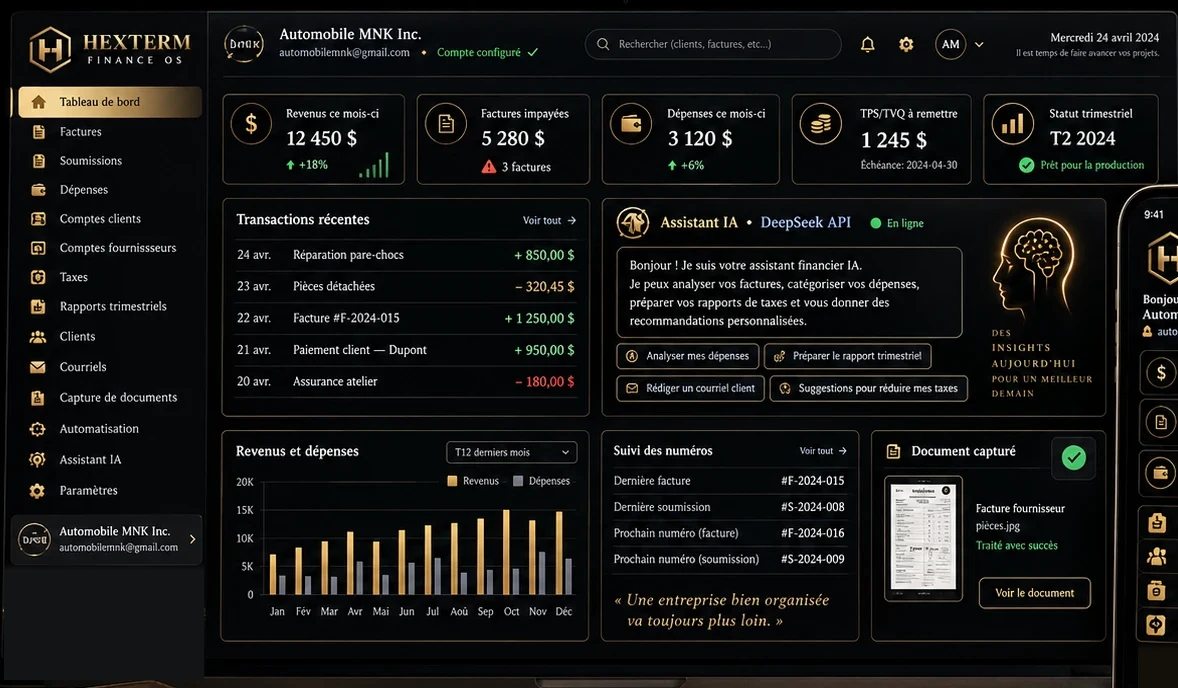
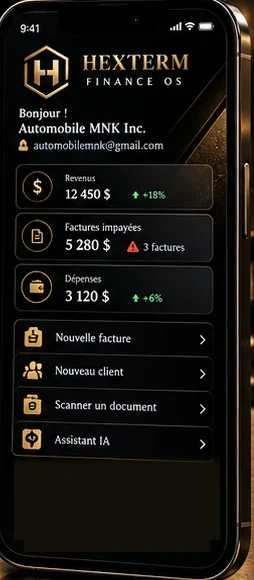
Connected together, field and finance speak the same language.
EDIFORIUM runs the field, Finance OS runs the finances. Connected, they simplify complete business management, from the first punch to the final margin.


As soon as a punch is confirmed in EDIFORIUM, approved hours are sent to Finance OS: payroll is prepared and the job site’s labour cost is recorded.
See everything that flows between EDIFORIUM and Finance OS
Each company keeps its data separate, and each user only sees what their permissions allow.
Crafted by digital artisans. Designed with security experts.
EDIFORIUM brings together two houses: Arcvelium’s build quality and Hexterm Security’s security expertise.
Premium craftsmanship
EDIFORIUM is designed and developed by Arcvelium, a digital studio specialized in custom solutions. Every screen and feature is built to be fast, reliable and a pleasure to use.

Security by design
Your job sites, employees, clients and numbers deserve serious protection. Hexterm Security supports EDIFORIUM with a Defense, Offense and Intelligence approach.
You may be wondering…
Who is EDIFORIUM for?
Construction contractors and their teams: owners, project managers, foremen and employees. Subcontractors and clients can be invited with limited access.
Does the app work without a signal on the job site?
Much of the app is designed to work offline. Data syncs automatically as soon as the phone is back online.
Is Finance OS required?
No. EDIFORIUM works perfectly on its own. Finance OS is an optional module you can connect if you want payroll, costs and invoicing to follow automatically.
What does the AI assistant do with my data?
It uses your company’s data to organize information, prepare reports and offer alerts or suggestions. Important decisions remain approved by a person, and the assistant respects each role’s permissions.
What do subcontractors and clients see?
Only what concerns them: their job site, tasks, plans and needed documents for a subcontractor; progress, selected photos, change orders and invoices for a client.
Which devices can I use EDIFORIUM on?
EDIFORIUM is planned for Windows, macOS, Android, iPhone and iPad, as well as the Web. Links will be available on the Downloads page.
How can I suggest an improvement?
Right from the app’s Idea center: share your experience or request an addition, a change or an improvement, and follow your request’s status.
Are the numbers shown on this site real?
No. The dashboards, amounts and scenarios shown are fictional demo data, and the large photos are mood images.
Let’s talk about your job sites.
Are you a construction contractor? Let’s discuss your needs or schedule an EDIFORIUM demo.
See downloads